
 Locations
  Treasury
  Login
Login 

eStatements are a simple, convenient way to review your account activity and monthly interest through Online Banking. They’re delivered each month at no charge.

Go Paperless with eStatements
Why Enroll in eStatements?
-
Faster access – View statements as soon as they’re available
-
More secure – Reduce the risk of lost or stolen mail
-
Convenient storage – Download and save statements digitally
-
Less clutter – Go paperless and reduce waste
1. Log in to online banking
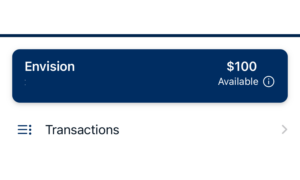
2. Click your account tile
Select the account tile you’d like to enroll. Please note, if you have more than one account, you must opt in separately for each account.
3. Click Settings
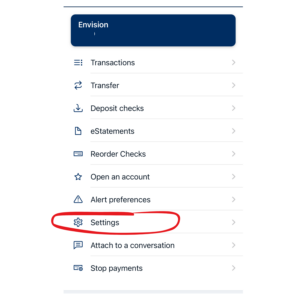
4. Follow the prompts to become enrolled
There are two options to enroll.
Option 1: Click the “enrolled” button and then “save” for the eStatements setting to update.
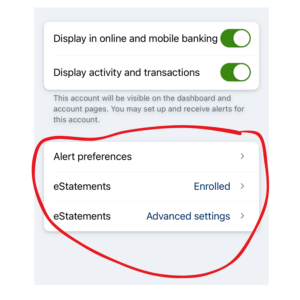
Option 2:
a) Click “Advanced settings”
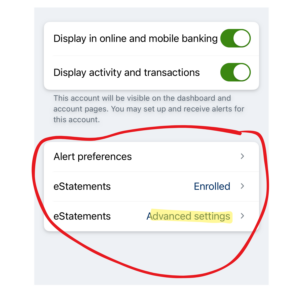
b) Click “Sign Up/Changes
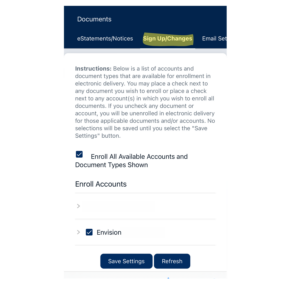
c) Choose the account you’d like to enroll and click all of the boxes. Click “save”

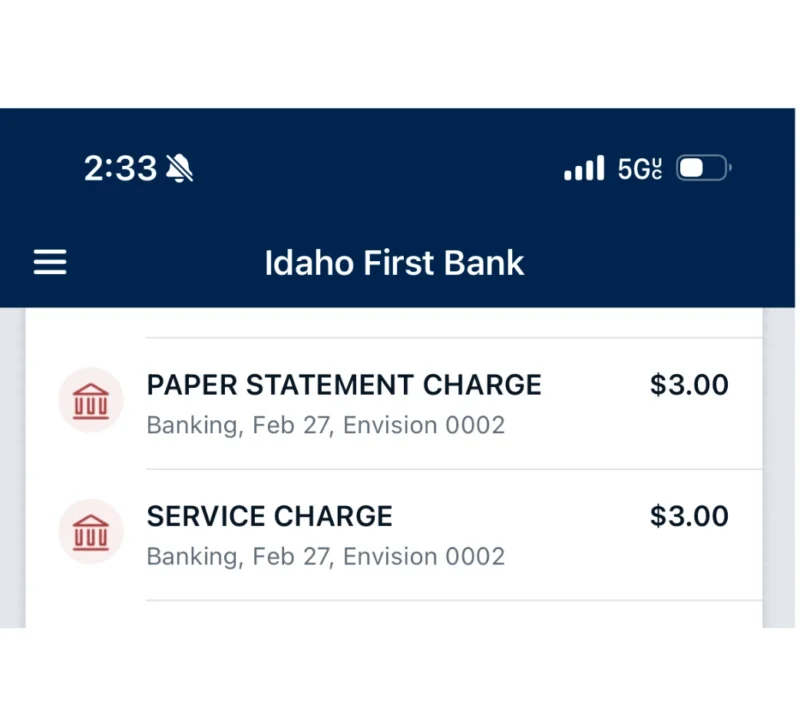
Still interested in paper statements?
Some accounts include paper statements, while others offer them for $3 per month. If you see a $3 paper statement fee on your account, it may appear as two separate lines on your statement. Please note that this is a single charge, with one line showing the fee and the other providing a description.
Let's Chat